
V6 Change log and release notes
Change log
Build 134
- Fixed issues with :
- Custom stock geometry.
- Home view fix with up and down arrow.
- Arc Reconstruction method.
- Thread tool modelling
Build 130
- Updated internal libraries .
- Fixed issue with <?> char
Build 126
- Fixed issue with chamfer tool
- Fixed issue on analyze tool
- Fixed issue with Lathe CY axis definition in side machining
Build 123
- Added delay on operation calculation
- Fixed time calculation issue with turning movement.
- Fixed button icons on Home treeview to move up and down the operations.
- Pocket Operation -> Stock override - fixed additional offset issue.
- Fixed contourn ramping 2D
Build 117
- Fixed issue with open profile selection.
- Fixed issue with operation visibility after clone toolpath machining delete.
Build 114
- Refactored code for update operations cycle. Multiple light operations can be updated in parallell.
- Fixed random bug when opening a new project and then reentering in the tab project while simulation was active
- Tool Store : Fixed Clone/Add tool menu in tool selection mode
- Dependency library updated
- Added buttons on top bar for tool and operation editing.

Build 106
- Clone toolpath array - Fixed issue with angular coordinate for mill 4th axis , B axis mode.
- Lathe module - Added option to reverse the finish direction completely for all the profile.
- Lathe module - Added Left threading option.
- Mill module - Chamfering operation - option to select starting point.
Build 103
-
New tool filter in tool store view
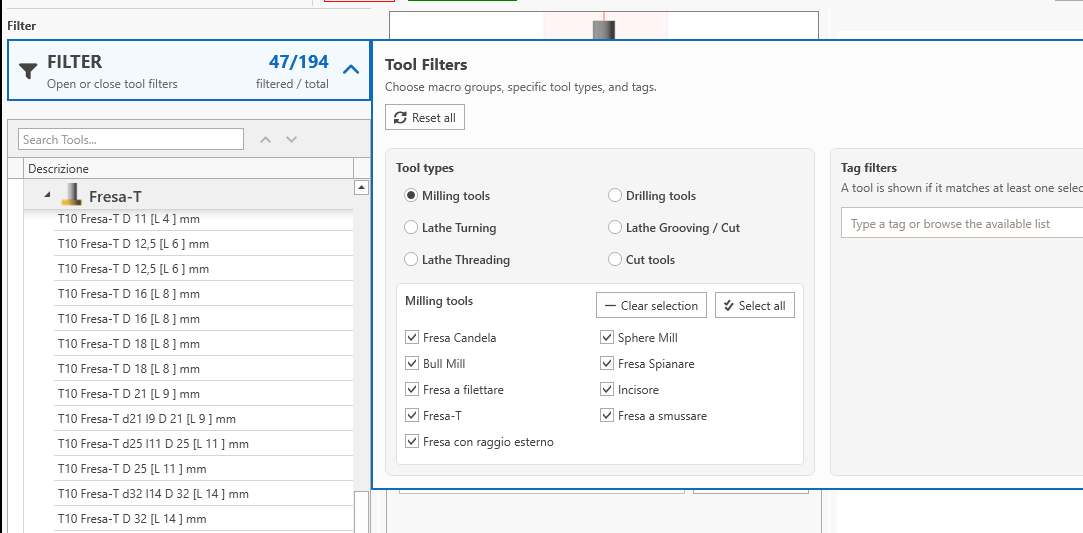
-
Is possible add TAG to each tool in order to filter them .
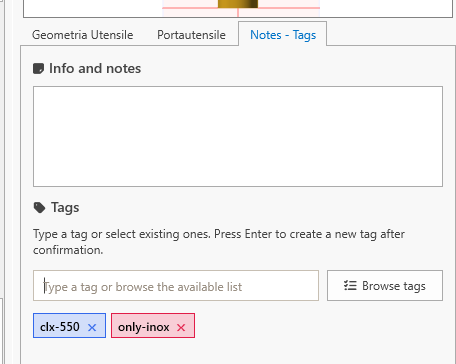
- Lathe Module - Fix with turnable profile extraction method and toroidal faces
- Lathe Module - Dedicated operations for reversed direction turning.
Build 101
- Lathe module - Fixed issue with Z level in cut-off and threading operation .
- Lathe module - Restored behaviour with angled chamfer in step profile and coordinate list pattern.
V5 -> V6 Changes
Core Platform Updates
-
Migration from .NET Framework to .NET Core
The application has been fully modernized by moving from .NET Framework to .NET Core.
This change improves long-term maintainability, performance, and cross-version compatibility.
No user-visible functional changes, but it ensures the product can evolve reliably in future releases.
New File Serialization (Binary → MessagePack)
Project and configuration data are now stored using MessagePack instead of the previous binary format.
This makes files faster to load, more stable across versions, and better suited for long-term compatibility.
Again, this does not affect user-visible functionality ( except for big files )
Licensing
-
Floating License instead of single fixed pc.
Licensing now supports floating usage:
- Only one PC can be active at a time per license.
- Active “slot” is automatically released when the application closes or after an inactivity timeout.
Ask to support if you need multiple pc active at same time.
Shared Data folder
- It is now possible to share tools, fixtures, tables, and related data across multiple PCs using folder-sharing services (e.g., Dropbox and similar).
More info on related page.
Post Processor
-
Post-Processor Initialization
Common machine types can now be generated quickly using an initial post-processor template.
Additional machines can be added on request.
Plane Rotation / Spatial Plane Support
Support added for:
- Fanuc – G68
- Siemens – CYCLE800
- Heidenhain – Spatial Plane
Some tags has been removed and other renamed. Double check generated gcode.
Setup sheet (PRO only)
Refactored setup sheet functionality.
It's possible print setup sheet with dedicated button.

More info -> Setup sheet feature
Lathe Module
Turning with insert drill option
With this option you can enlarge hole with insert drill operation

Rest machining area defined by simulated stock
Is possible recognize previously machined area by using the simulated stock
Grooving with multiple step
Is possible machine the groove with multiple step depth . This is useful for depth grooves.
CIMCO Edit Integration (PRO Only)
-
Direct export of tool tables and fixture data to CIMCO Edit is now supported.
Default setting
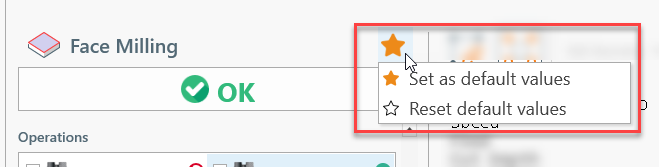
It's possible save inputed default values for each operation. This will help to save time by saving as default the recurring input value
Thumbnails preview on home screen
On project save a thumbnail will be created and it will be visualized on home screen.

V-Engrave
Added support for v-engrave mode

Breaking Changes
- Only v5 project files can be opened. Files from v4 or older are not supported.
- All files created or imported in v6 (projects, machines, posts, tools, etc.) cannot be opened by older software versions.
Import fixture and tools from version 5
from build 34
In version 5 the fixtures were stored in file :
C:\Users\<user-name>\Documents\ECAM V5\Data\Database.db
Tools were stored in file :
C:\Users\<user-name>\Documents\ECAM V5\Data\ToolStore.tst
You can import that data files by dragging it into [Drag and Drop] area in home screen.

Will follow the import procedure.
Click OK when done.

Ask Support directly from App
From build 96
Ask for help or report problems directly from application.
Your request message will be sent to support with project file and application screenshot , if selected.

Several others minor changes are made .
UI changes in post processor / tool store / fixture dialog .
Stock memo property and related tags on post editor.
Refactored code in coordinate list pattern ( chamfer / radius method bug fixes ).
UI library update.
Removed obsolete dependencies.