
Shared Data Folder
From Version 6
By default, the application stores all data locally on a single PC, and each installation works with its own independent dataset.
To work on multiple computers using the same tools, machines, and configuration tables, it is possible to enable a shared data folder.
When a shared folder is configured, all installations use the same synchronized data, ensuring consistency across different PCs.
Default local DATA folder :
C:\Users\<username>\Documents\ECAM V6\Data
Enable shared data folder
The shared folder functionality is based on file synchronization systems such as Dropbox, OneDrive, and Google Drive .
First you need to have one of this system installed in all pc you need to share the data.
Once you have installed a folder sharing service , follow these configuration step.
Configuration steps:
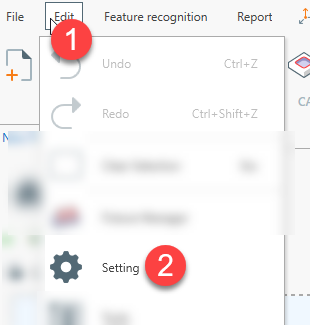
- Open menu Edit → Settings
- Go to the Shared Data Folder tab
- Enable the Use shared data folder option
- Try common folder , to find automatically existing folder. Or manually browse folder if it's not possibile find the folder automatically.
- ( OPTIONAL ) Copy local data copies any existing data from the local folder . Local data is transferred to the selected shared data folder
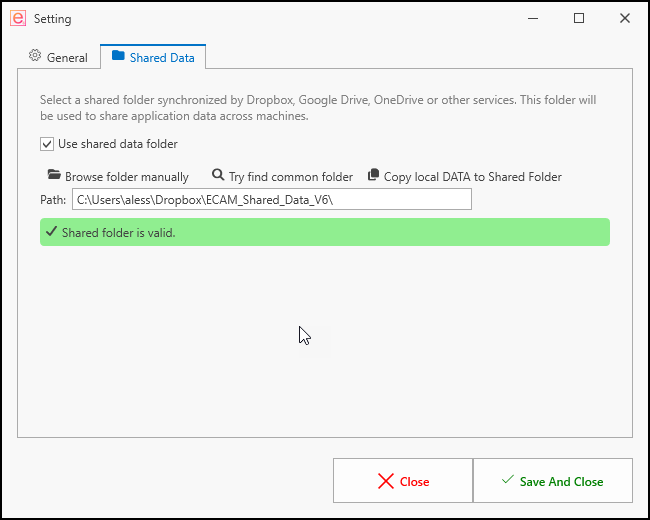
For example, this is the DropBox shared folder with the updated status in all files.

The selected folder has to be in the shared folder has to be in the same pc where you run ecam.
The folder will be syncronized with the folder syncronization software.
Don't use a network path folder.